
A clear source revision
Identify which architectural revision is being handed over. A shared reference helps both disciplines discuss the same building when reviewing the analytical result.
Your architectural model carries the design intent. NodeSnap helps translate an ArchiCAD SAF or IFC export into the analytical model the structural engineer needs for the LIRA-SAPR workflow.
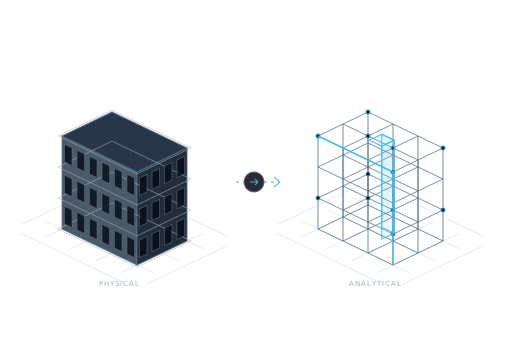
Book a demoThe physical form in an architectural model and the analytical representation used by an engineer serve different purposes. A structural handoff has to preserve useful design information while allowing the engineer to establish members, axes, connections, and supports.
NodeSnap supports this translation by extracting geometry, sections, materials, and supports from the export. It aligns members, resolves junctions, and snaps nodes. The engineer then reviews whether the analytical representation expresses the intended structure.
These are practical handoff habits for your team, alongside the automated model preparation.
Identify which architectural revision is being handed over. A shared reference helps both disciplines discuss the same building when reviewing the analytical result.
Keep the source’s sections and materials in the conversation alongside its shape. NodeSnap’s verification compares these properties as well as geometry and axes.
Explain the intent behind revisions that affect structural elements. Revision comparison handles model changes; the engineer also needs context for interpreting their consequences.
The goal is a useful conversation about the design, supported by a connected model workflow.
Identify the ArchiCAD model and the SAF or IFC export used for the exchange. Make the design revision clear to everyone involved.
Provide the export and relevant design context. NodeSnap’s workflow requires no extra plugin or special modelling convention for the conversion process.
The structural engineer reviews the converted elements and their source comparisons. Resolve questions about intended geometry or properties with the design team.
Provide the revised export and explain changes that affect the structure. Revision sync updates changed elements while retaining the engineer’s loads and assumptions.
NodeSnap connects information across the handoff. Each discipline retains the decisions it is best placed to make.
| Architectural team | Structural team |
|---|---|
| Communicates the physical design and its intent | Establishes the analytical idealisation for the structure |
| Provides the relevant SAF or IFC export | Reviews converted geometry, axes, sections, and materials |
| Explains design revisions | Assesses their implications for loads, supports, and assumptions |
An architectural model is a starting point. NodeSnap prepares an analytical representation, and the structural engineer reviews the idealisation before continuing with the LIRA-SAPR analysis workflow.
Revision sync compares architectural revisions and updates changed elements while retaining engineering information. Explore the revision sync product page for the workflow and the decisions that accompany an update.
Tell us how you export from ArchiCAD and exchange revisions with structural engineers. We’ll discuss the workflow around your design process.
Request a demo