
Identify the design being analysed
Pair the model with its architectural source revision. Establish which elements and design information form the basis for the analytical model.
Use the architectural model as the starting point for your LIRA-SAPR analytical model. NodeSnap helps with conversion, revision updates, and source comparison so you can focus on the engineering decisions the model requires.
Book a demoTurning an architectural export into an analytical model involves more than drawing the same building again. You need to establish how members connect, where analytical axes belong, and whether the resulting representation supports the intended analysis.
NodeSnap extracts geometry, sections, materials, and supports, then aligns members, resolves junctions, and snaps nodes. The result gives you something concrete to inspect against the source while you decide how the structure should be represented.
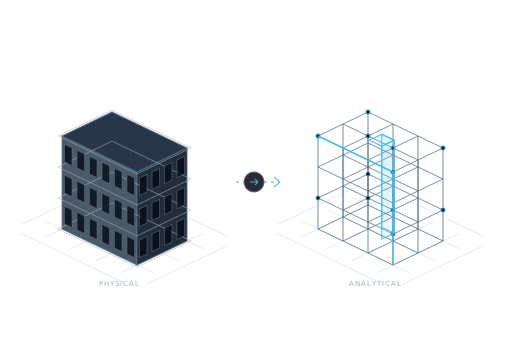
Start with an SAF or IFC architectural export. Convert the source information into an analytical model for the LIRA-SAPR workflow.
Explore conversionUpdate the changed elements while retaining loads and assumptions. Review what the design change means for the engineering work already in the model.
Explore revision syncCompare geometry, axes, sections, and materials with the source. Investigate suspicious results before you continue with analysis.
Explore verificationA useful model is one you can explain, including the decisions that turn geometry into an engineering representation.
Pair the model with its architectural source revision. Establish which elements and design information form the basis for the analytical model.
Inspect member connectivity, analytical axes, and supports. Confirm that the model expresses the load path and restraints you intend to analyse.
Decide how loading, boundary conditions, and the relevant design requirements apply. Conversion provides model information; these choices still require structural engineering judgment.
Use revision comparison to update the model, then examine retained loads and assumptions in light of the revised design. A retained value still needs to be appropriate.
| Bring | Why it helps |
|---|---|
| An example architectural export | Shows the geometry and properties you receive from the design team. |
| A description of your LIRA-SAPR workflow | Clarifies where preparation ends and analysis begins. |
| A typical architectural revision | Makes the repeated update work and review needs concrete. |
| Examples of difficult elements | Focuses the discussion on junctions, axes, or properties that need the most attention. |
NodeSnap’s workflow prepares and checks the analytical model for LIRA-SAPR. Structural analysis, interpretation of results, and design decisions remain part of the engineer’s work.
Verification gives you element-level comparisons and flags suspicious results. You still decide whether the analytical representation is suitable for the structure and analysis you are responsible for.
Tell us how an ArchiCAD export becomes your LIRA-SAPR model and where conversion or revision review takes the most effort.
Request a demo